Customer information has a habit of ending up everywhere. Sales notes sit in spreadsheets, emails contain important conversations, and follow-up reminders live in someone's calendar. It might work when you have a handful of customers, but as your business grows, keeping track of every interaction becomes increasingly difficult.
That's where CRM software comes in.
Customer Relationship Management (CRM) software gives businesses one place to manage customer information, sales opportunities, communication history, and ongoing relationships. Instead of relying on scattered systems or individual employees, everyone works from the same up-to-date customer record.
Whether you're looking to improve sales, deliver better customer service, or simply keep your team organised, a CRM helps streamline the way your business manages customer relationships.
In this guide, we'll explain what CRM software is, what it does, its key features, the benefits it offers, and how to choose the right solution for your business.
What is CRM software?
CRM software is a business application that helps companies manage customer relationships throughout the entire customer lifecycle. It stores customer information in one central location while tracking every interaction, including emails, phone calls, meetings, sales opportunities, quotes, purchases, and support requests.
The goal is simple: give every team access to the same customer information so they can work more efficiently and provide a better customer experience.
Imagine a potential customer submits an enquiry through your website. A salesperson contacts them, schedules a meeting, sends a proposal, and closes the deal. A few months later, the customer contacts support with a question before eventually renewing their contract.
Without a CRM, those interactions might be spread across inboxes, spreadsheets, notebooks, and different software systems. Finding the full customer history often means asking several employees or searching through multiple applications.
With CRM software, every interaction is stored in one place. Anyone with the appropriate access can instantly see previous conversations, outstanding tasks, purchase history, and the next recommended action.
Modern CRM platforms are used by far more than sales teams. Marketing, customer service, management, and even finance departments often rely on the same customer data to improve collaboration and make better business decisions.
What is CRM software used for?
CRM software supports a wide range of business activities that involve customers, prospects, and ongoing relationships.
Common uses include:
- Managing customer and company records
- Capturing and assigning new leads
- Tracking opportunities through the sales pipeline
- Recording customer interactions
- Scheduling follow-up activities
- Managing quotes and proposals
- Supporting customer service
- Running targeted marketing campaigns
- Monitoring sales performance
- Creating reports and forecasts
Different teams use the same CRM in different ways.
A salesperson may use it to prioritise follow-up calls and update opportunities after meetings.
A customer service representative can quickly review previous support requests before responding to a customer.
Marketing teams use CRM data to segment audiences and measure campaign performance.
Managers rely on dashboards to monitor sales performance, identify bottlenecks, and forecast future revenue.
Because everyone works from the same information, communication becomes more consistent and important details are less likely to fall through the cracks.
Key features of CRM software
While CRM platforms vary in functionality, most include a core set of features designed to help businesses organise customer relationships more effectively.
Contact management
Every customer and prospect has a dedicated profile containing contact details, company information, communication history, documents, and notes. This creates a single source of truth that everyone can access.
Lead management
New enquiries can be captured automatically from website forms, emails, referrals, or marketing campaigns. Leads are then assigned to the appropriate salesperson, helping ensure every opportunity receives attention.
Sales pipeline management
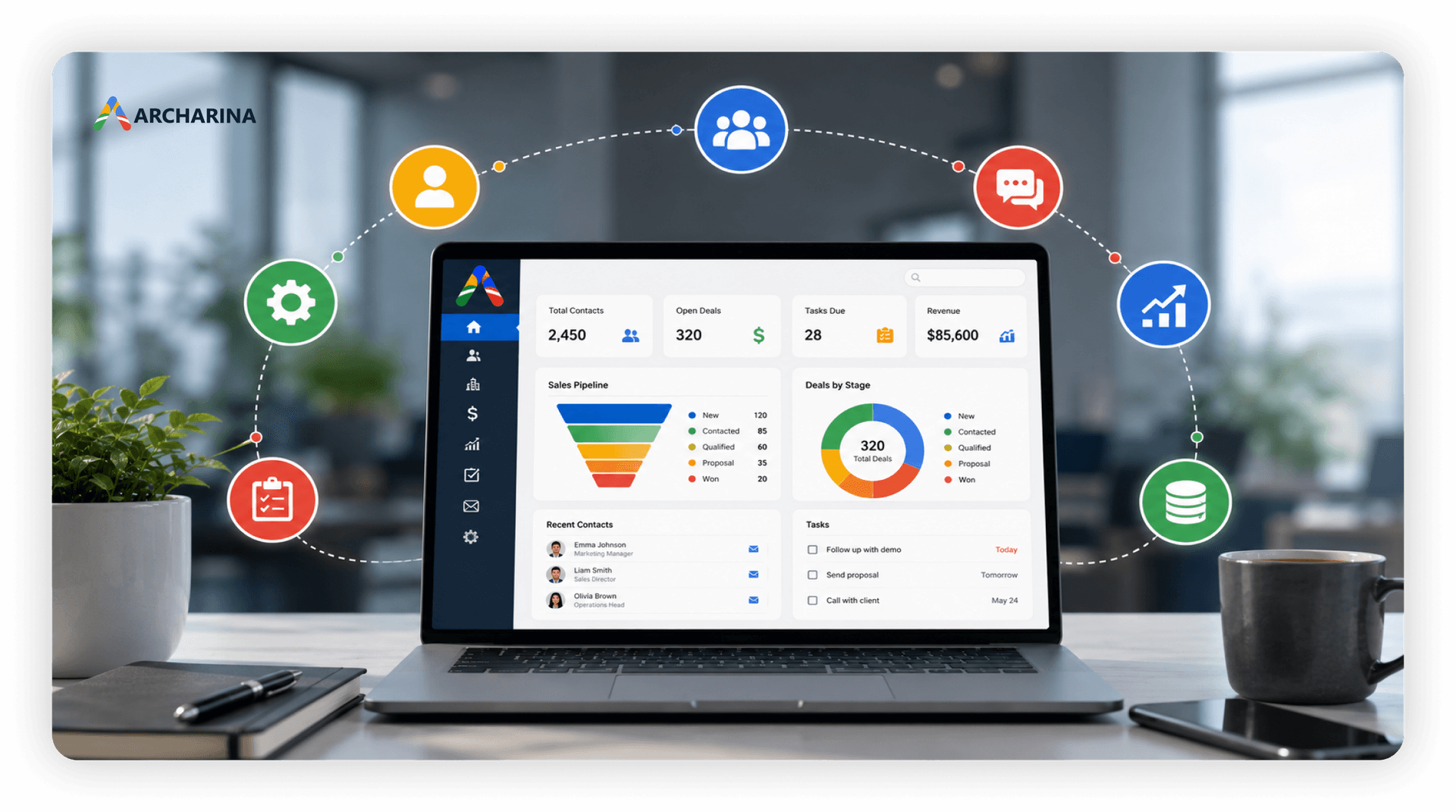
A visual sales pipeline shows where every opportunity sits in the sales process.
Typical stages might include:
- New enquiry
- Qualified lead
- Discovery
- Proposal sent
- Negotiation
- Closed won
- Closed lost
This visibility makes it easier for both sales teams and managers to understand what's progressing and where deals may be stalling.
Activity tracking
Every customer interaction can be recorded, including emails, phone calls, meetings, tasks, and internal notes.
Having a complete history means anyone can step into an account without asking the customer to repeat previous conversations.
Task and follow-up management
CRM software helps teams stay organised by scheduling reminders for calls, meetings, proposals, and other important activities.
Rather than relying on memory, employees always know what needs to happen next.
Workflow automation
Many CRM systems automate repetitive administrative tasks, such as:
- Assigning new leads
- Sending confirmation emails
- Creating follow-up reminders
- Updating opportunity stages
- Notifying managers about important deals
Automation reduces manual work while improving consistency across the business.
Reporting and dashboards
CRM dashboards provide real-time visibility into business performance.
Managers can quickly review metrics such as:
- Sales pipeline value
- Lead conversion rates
- Team activity
- Revenue forecasts
- Win rates
- Sales performance
Instead of manually compiling reports, businesses can make decisions using live data.
Integrations
Modern CRM software often connects with other business applications, including:
- Microsoft 365
- Outlook
- Google Workspace
- Accounting software
- Marketing platforms
- Customer support tools
- ERP systems
- Website forms
These integrations reduce duplicate data entry and keep information synchronised across different systems.
Mobile access
Many CRM platforms include mobile applications that allow employees to update records, access customer information, and manage opportunities while working remotely or visiting customers.
This is particularly valuable for field sales teams and service businesses.
Benefits of CRM software
The biggest advantage of CRM software isn't simply storing customer information. It's giving your entire business a more organised and consistent way to manage customer relationships.
Better sales performance
Sales teams spend less time searching for information and more time building relationships.
With clear visibility into every opportunity, they can prioritise follow-ups, prepare for meetings more effectively, and keep deals moving through the pipeline.
Managers also benefit from improved forecasting and a better understanding of overall team performance.
Improved customer service
Customers expect businesses to remember previous conversations.
A CRM gives service representatives immediate access to purchase history, previous support requests, account information, and recent communications.
This reduces frustration, speeds up issue resolution, and creates a more personalised customer experience.
Stronger marketing campaigns
Marketing teams can segment contacts based on industry, location, buying behaviour, or previous interactions.
Instead of sending the same message to everyone, campaigns become more relevant and measurable.
CRM data also helps marketing understand which campaigns generate qualified leads rather than simply attracting website visitors.
Better collaboration
One of the most valuable benefits of CRM software is improved collaboration between departments.
Sales, marketing, customer service, and management all work from the same customer records, reducing duplicate work and improving communication.
If a customer speaks to multiple employees, everyone has access to the same information and understands the relationship's history.
Improved reporting and decision-making
Accurate reporting is difficult when information is spread across different systems.
A CRM provides real-time dashboards that help managers answer important questions quickly.
Which opportunities are likely to close this month?
Which sales activities generate the best results?
Where are customers dropping out of the buying journey?
Having this information readily available helps businesses make faster, more informed decisions.
CRM vs. spreadsheet
Many businesses begin by managing customer information in spreadsheets. It's a practical starting point because spreadsheets are inexpensive, familiar, and easy to set up.
However, as your customer base grows, spreadsheets become harder to maintain. Team members create multiple versions of the same file, follow-up reminders are easily overlooked, and customer history becomes scattered across emails, notes, and documents.
CRM software is designed to solve these challenges by connecting customer records, sales opportunities, communication history, and tasks in one central system.
| Feature | Spreadsheet | CRM software |
|---|---|---|
| Customer records | Basic contact lists | Complete customer profiles with history |
| Follow-ups | Manual reminders | Built-in tasks and notifications |
| Sales pipeline | Manual updates | Visual pipeline with real-time progress |
| Collaboration | Multiple file versions | Shared information for all users |
| Reporting | Created manually | Live dashboards and reports |
| Customer history | Spread across different files | Available in one place |
| Automation | Very limited | Automates repetitive workflows |
| Scalability | Difficult as the business grows | Built to support growing teams |
A spreadsheet may still be enough for a small business with only a few customers. But once several employees are managing leads, handling customer enquiries, or tracking sales opportunities, a CRM provides the visibility and structure needed to work more efficiently.
Signs your business needs CRM software
Many businesses don't realise they need a CRM until growth exposes gaps in their existing processes.
If any of the following situations sound familiar, it may be time to move beyond spreadsheets and disconnected systems.
Customer information is scattered
Your sales team keeps notes in spreadsheets, customer service relies on email, and managers request updates from different people every week.
A CRM brings all customer information together so everyone works from the same records.
Follow-ups are being missed
Opportunities often depend on good timing.
If sales representatives forget to call prospects back or important tasks rely on personal reminders, valuable business can easily be lost.
CRM software schedules reminders and tracks outstanding activities automatically.
Managers lack visibility
Questions like these shouldn't require hours of manual reporting:
- How many active opportunities do we have?
- What's our expected revenue this month?
- Which sales representative has the strongest pipeline?
- Where are deals getting stuck?
A CRM provides these answers through live dashboards and reports.
Teams duplicate work
Without shared customer records, it's common for different employees to contact the same prospect or ask customers for information they've already provided.
A CRM improves collaboration by giving everyone access to the same communication history.
Business growth is creating complexity
Processes that work for a small business often become difficult to manage as customer numbers increase.
A CRM introduces consistency without making everyday work more complicated.
How to choose the right CRM
There are hundreds of CRM platforms available, each offering different features and pricing models. The best solution isn't necessarily the one with the longest list of features. It's the one that fits the way your business actually operates.
Here are a few factors to consider when evaluating CRM software.
Start with your business challenges
Before comparing products, identify the problems you're trying to solve.
For example:
- Are leads slipping through the cracks?
- Is customer information difficult to find?
- Do managers struggle to forecast sales?
- Are employees spending too much time on manual administration?
Knowing your priorities makes it much easier to evaluate potential solutions.
Look for ease of use
Even the most powerful CRM won't deliver value if employees avoid using it.
Choose software with an intuitive interface that makes everyday tasks quick and straightforward.
Review customisation options
Every business has its own sales process.
Your CRM should allow you to customise pipelines, fields, workflows, and reports without requiring extensive technical knowledge.
Check integrations
Your CRM should work alongside the systems you already use.
Look for integrations with tools such as:
- Microsoft 365
- Outlook
- Google Workspace
- Accounting software
- Marketing platforms
- Customer support applications
- ERP systems
Reducing duplicate data entry saves time and improves data accuracy.
Consider reporting capabilities
Good reporting helps managers make better decisions.
Choose a CRM that provides clear dashboards for sales activity, pipeline value, conversion rates, revenue forecasts, and team performance.
Think about future growth
Your requirements today may be very different in three years' time.
Selecting a CRM that can scale with your business reduces the need to migrate to another system later.
Conclusion
CRM software is much more than a digital contact list. It provides a structured way to manage customer relationships, improve collaboration, and give every team access to accurate, up-to-date information.
By centralising customer records, tracking sales opportunities, automating routine tasks, and providing real-time reporting, a CRM helps businesses operate more efficiently while delivering a better customer experience.
Whether you're replacing spreadsheets or upgrading from an outdated system, investing in the right CRM can improve visibility, strengthen customer relationships, and support long-term business growth.
If you're looking for a practical CRM solution that combines contact management, sales pipeline tracking, task management, and reporting in one easy-to-use platform, ArcCRM helps businesses keep customer information organised while giving teams the visibility they need to manage every relationship more effectively.